
ARGELLAN / CodexControl
CodexControl
See the work behind the activity.
CodexControl is a browser workbench for observing Codex sessions, workers, subagents and the machines supporting their work. It connects live activity to captured source records, so you can move from an event on the screen to its timestamp, worker context and place in the execution history.
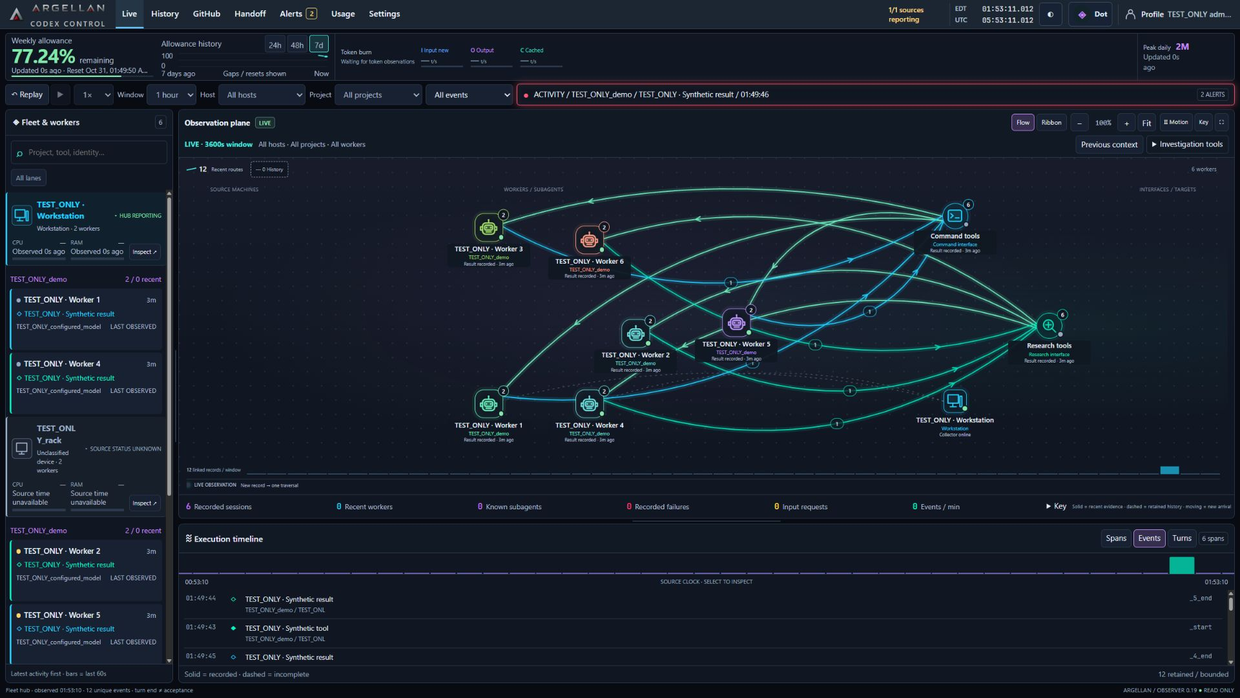
Worker activity, execution history and source context in one dashboard.
Source details
CodexControl R5 · 24 October 2026 · TEST_ONLY synthetic fixture.
For developers managing work across sessions and machines
CodexControl serves developers and engineering leads who need a coherent view of agent-assisted work. It brings together worker relationships, tool activity, source health and observed usage without requiring the operator to reconstruct the sequence from separate chat windows.
The observer distinguishes the machine running Codex from a remote machine carrying out work. A host-health reading describes that host; an explicit job identity connects a recorded job to its worker. Missing completion and unavailable telemetry remain visible instead of becoming an invented success.
From a live event to an inspectable record
Observe the permitted source records
A collector reads local Codex event records and normalizes permitted operational metadata. Its authenticated outbox retains batches for retry.
Preserve the accepted observations
The hub validates the source, commits accepted records to its durable journal and acknowledges the batch. Stable identities and recoverable cursors keep retries and history navigation coherent.
Follow the activity
Use the activity map or ribbon, execution timeline and source filters to follow workers and their relationships. Select an event to open its record in the Inspector.
Review the sequence
Freeze the observed timeline or enter replay to examine captured history. Return to Live when you are ready to follow incoming activity again.
What you can inspect
| Event-linked activity | The activity map, ribbon and timeline refer to captured event identities and timestamps. |
|---|---|
| Worker and subagent context | Explicit parent relationships, recorded tool activity and command or item durations. |
| Source and host health | Source gaps, stale observations, unknown states and separately identified execution targets. |
| History and replay | Paged journal history, frozen source-clock replay and synchronized selection. |
| Usage observations | Captured token and allowance information with source, time and missing-data distinctions. |
| Presentation controls | Resizable panes, light and dark presentation, motion controls and reduced-motion support. |
| Scoped access | Authenticated collection and viewer scopes; presentation settings are separate from worker execution. |
Inputs and outputs
Inputs include permitted local Codex JSONL records, account-usage observations where a source is attached, and optional structured job and health observations from execution targets. The collection boundary excludes prompts, command arguments, raw results, private reasoning and credentials.
Outputs include the browser activity views, inspectable event records, recoverable history and observed-usage views. An optional archive path preserves exact usage-row versions with receipts. Optional historical analytics builds derived reports from retained records; it does not replace the archive or recover information that was never captured.
Technical profile and deployment discussion
| Application | Node.js hub and collectors with a browser interface built from JavaScript, DOM and Canvas. |
|---|---|
| Runtime | Node.js 24 or later is required by the baseline package. Use the version pinned to the selected release. |
| Storage | Durable SQLite journal; separately configured archive storage for exact usage versions. |
| Host arrangement | A hub receives authenticated observations from enrolled source machines. A local gateway can provide browser access. |
| Deployment environments | Windows collection and a Linux ARM64 hub are documented. The installation package and operating system must be qualified together. |
| Optional components | Read-only GitHub metadata and Python/DuckDB historical analytics have separate configuration and activation boundaries. |
| Evaluation scope | Confirm source visibility, host enrollment, retention needs and supported browser behavior for the chosen build. |
Questions about CodexControl
Can CodexControl start or stop my workers?
The observer described here is read-only with respect to worker execution. A separate Windows control foundation has demonstrated lifecycle actions on sessions it owns. That work does not make arbitrary existing sessions controllable from the observer.
Is the activity animation tied to actual records?
Yes. Activity uses captured event identities and timestamps. The Inspector provides the underlying context; an open or unknown event stays distinct from a recorded completion.
Are usage values the same as an invoice?
No. They are observations from the available source. Resets, stale readings, missing counters and overlapping scopes affect how they can be interpreted.
Does replay resume a Codex session?
Replay changes the view of captured history. Returning to Live changes the presentation clock; it does not resume or dispatch work.
Can I evaluate it with my own machine layout?
Contact ARGELLAN with your source hosts, execution targets and retention requirements. We can define the relevant collector, hub and browser scope for a product review.
Make your agent-assisted work inspectable.
Tell us what you need to accomplish, the environment you operate and the constraints that matter.
Discuss CodexControlOpens your email application. No message is submitted by this website.